
Street-O map from OpenStreetMap
Draw an orienteering-style map of any town or campus from OpenStreetMap, with no scan, ready for a course.
For a quick urban or campus event you don't need a scan. oSplit can draw a street-O map from OpenStreetMap data: buildings, paths, fences, walls, water, open land and out-of-bounds areas. You need to be signed in.
#Make the map
- Open the Studio and press Make from OpenStreetMap.
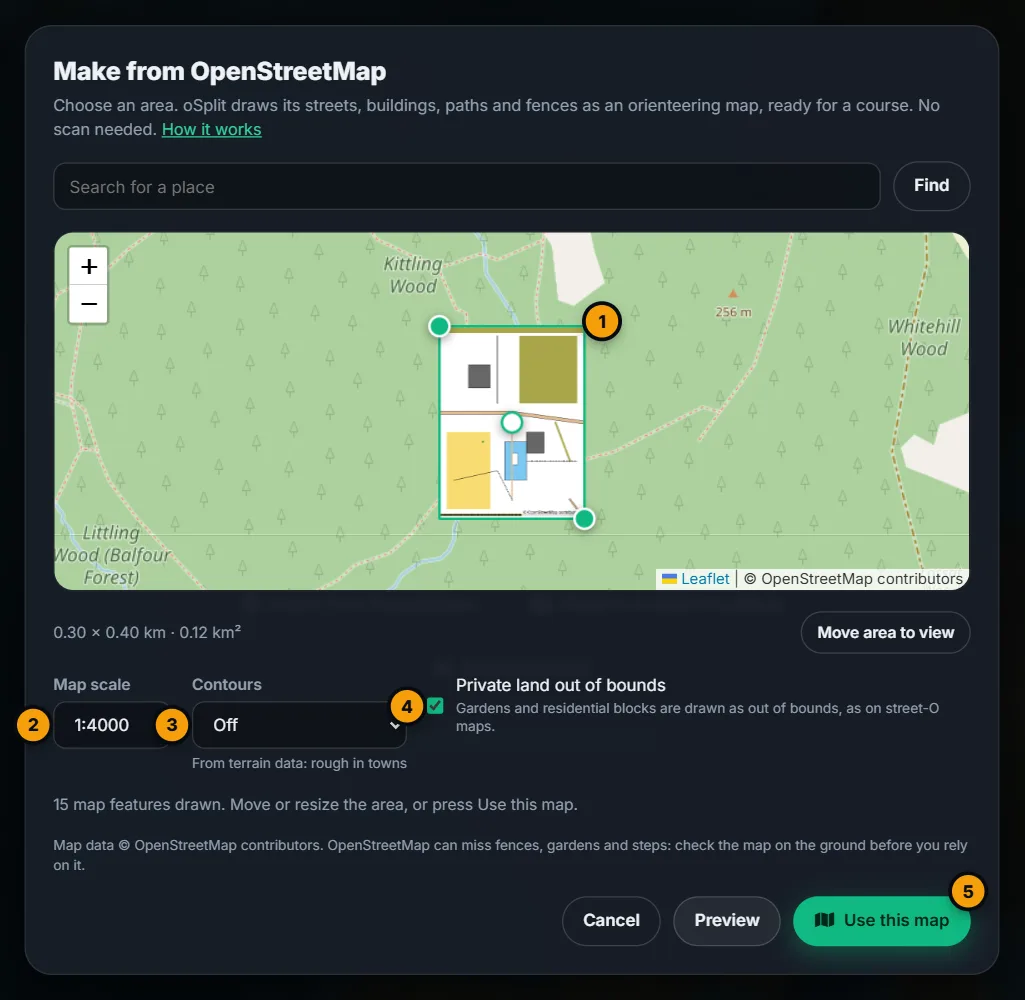
- Move the map to your area. Find searches for a place name.
- Drag the green rectangle, or its corners, over the area. Press Move area to view to fit it to what you see. The size shows under the map, such as 0.30 × 0.40 km · 0.12 km².
- Choose a Map scale (1:4000, 1:5000, 1:7500 or 1:10000), whether to draw Contours, and whether Private land is out of bounds.
- Press Preview. The map is drawn over the rectangle, with a note of how many features were drawn.
- When it looks right, press Use this map.
The Studio opens at the Course stage, because the map is already exactly aligned. Place the start, the controls and the finish, and publish: see Draw the course and Publish.
#Limits
- The area can be at most 3 km a side and 4 km², and at least 100 m a side. The rectangle holds to this as you drag it.
- A busy town centre can take up to a minute to fetch. If OpenStreetMap is busy you are asked to try again in a minute.
- Making maps is limited to a number an hour for each person.
#What is drawn
Buildings, roads and paths, steps, water, fences, walls, hedges, railways, trees, open ground and out-of-bounds areas are drawn. Motorways and trunk roads, and land used by the military or for construction, quarries, landfill and industry, are out of bounds. With Private land out of bounds on, gardens, residential blocks, allotments and areas marked private are out of bounds too.
Changing the scale or the private-land switch redraws the preview without fetching again. Moving or resizing the area clears it.
#Contours
Contours is off by default. Choose 2.5 m, 5 m or 10 m to draw contour lines in brown, with every fifth line heavier. They are made from open terrain data, so they are rough in towns, where the ground is built over, and they show nothing where the ground is nearly flat. If the heights can't be fetched, the map is drawn without contours and says so.
Contours are only for maps made from OpenStreetMap. A map with contours also carries the terrain credit, Contours: AWS Terrain Tiles (Mapzen, USGS, EU-DEM and others).
#Check it on the ground
OpenStreetMap is made by volunteers and can miss fences, gardens and steps. Check the map on the ground before you rely on it. The same warning is in the dialog and shown when the map opens in the Studio.
#Credit
The map carries © OpenStreetMap contributors in a corner of the image and in its details, and a course's page shows Map data © OpenStreetMap contributors. The credit is part of the licence: don't remove it.
In the Studio, your browser fetches the terrain tiles for contours from Amazon S3, so Amazon sees your internet address and which tiles you ask for, but not your account. The privacy notice says the same.
No separate scan is stored for these maps, because the drawing is the map.